Here is a list of keyboard shortcuts available in the game.
Screens
对话框
Demesne navigation
Map modes
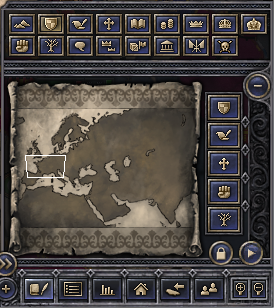
The minimap and map modes
| Key |
Icon |
Map mode |
Notes
|
| q |
 |
Terrain |
Terrain affects troop movement speed, attrition, and combat defensive bonuses.
|
| w |
 |
Realms |
^Ctrl+Left-click a realm to see its subrealms. (Undo with ^Ctrl+Right-click or by pressing W again.)
|
| e |
 |
Diplomatic relations |
Colors indicate your allies, enemies, demesne, and vassals. Hover over a yellow province to see your pending Casus Belli (CBs) against it. Click on a province to see their relations.
|
| r |
 |
Religions |
Click a religion to see its holy sites. To see autocephalous patriarchs, use the Religion screen (F9) instead.
|
| t |
 |
Cultures |
Hover for culture groups.
|
| u |
 |
Economy |
Green is ripe for raiding.
|
| i |
 |
De jure duchies |
Hover to confirm the duchy's de jure capital.
|
| o |
 |
De jure kingdoms |
Also shows duchies drifting into kingdoms. Hover to see crown laws effective in each province.
|
| p |
 |
De jure empires |
Also shows kingdoms drifting into empires.
|
| a |
 |
Revolt risk |
Don't park (small retinues) on red.
|
| s |
 |
Dynasties |
Colored according to largest realm, so flipping with "realms" view lets you see which dynasties control multiple realms. ^Ctrl+click a realm to see the dynasties controlling its subrealms.
|
| d |
 |
Opinions |
Click a province to see opinions of its ruler. Hover for reasoning.
|
| f |
 |
Direct vassals |
Find the largest vassals in another realm, and get them to inherit into your realm!
|
| g |
 |
Trade zones |
Republics and silk road. ^Ctrl+click any republic to see the trade zones of each patrician family.
|
| h |
 |
Governments |
Government types
|
| j |
 |
Coalitions |
Hover to see any realm's infamy. Click ocean to see which realms have defensive pacts against them. Click a realm to see the defensive pacts against it, colored by religion group.
|
| k |
 |
Epidemics |
Hover the banner to see when and where epidemics began. Hover a province to see its hospital level, disease resistance, and "infection weight" from any adjacent epidemic.
|
|
 |
Players |
Other human players in multiplayer.
|
|
 |
Chinese relations |
Shows China's "Western Protectorate" territory (red), peace deals (green), imperial tributaries (purple), and diplomatic range (blue).
Opened by right-clicking the "China screen" button
|
Armies
| Key |
Function
|
| Alt+Drag |
Select only naval units
|
| ⇧Shift+Drag |
Select only units of the same type as the currently selected unit
|
| ⇧Shift+Left-Click |
Add or remove a unit to the selection
|
| ⇧Shift+Right-click |
Add waypoint (repeat to specify a precise route to a destination)
|
| x |
Disband unit
|
| ⇧Shift+x |
Disband all selected units
|
| g |
Merge the selected units
|
| b |
Create new unit (with one unit selected) OR Reorganise the selected units (with two units selected)
|
| n |
Split unit in half (with one unit selected)
|
| v |
Embark unit
|
| ⇧Shift+v |
Embark all selected units
|
| z |
Raise all of a vassal's troops (including from other counties) into the selected county
|
| c |
Raise all of a vassal's fleets (including from other counties) into the selected county
|
Province owners
| Right-click province with... |
Function
|
| Right-click |
Holder: character sheet
|
| Alt + Right-click |
Holder: diplomatic actions
|
| ⇧Shift + Right-click |
Top liege: character sheet
|
| ⇧Shift + Alt + Right-click |
Top liege: diplomatic actions
|
Camera control
| Key |
Icon |
Function |
Notes
|
| PageUp |
 |
Zoom in |
|
| PageDown |
 |
Zoom out |
|
Backspace
or 🏠 Home |
 |
Focus camera on capital province.
|
Game control
| Key |
Icon |
Function |
Notes
|
| + |
 |
Increase game speed |
Speed 5 is "unlimited speed" (i.e. as fast as the computer can process).
|
| - |
 |
Decrease game speed |
|
| ␣ Space |
 |
Pause/Unpause |
Some notifications can be configured to auto-pause the game.
|
Alt+2+1
or backtick (`) |
|
Console |
|
| ←Esc |
 |
Main menu |
Closes any open GUI windows sequentially (beginning with last opened) before displaying Main Menu panel.
|
Take screenshot
| Key |
Function |
Notes
|
| F10 |
Map screenshot |
Entire map, rendered in 2D and colored according to the current map mode
Stored in ~/Documents/Paradox Interactive/Crusader Kings II/Screenshots
Example map for Religion, more examples in Category:Maps
|
| F11 |
Screenshot |
Stored in ~/Documents/Paradox Interactive/Crusader Kings II/Screenshots
Stored in ~/Documents/Paradox Interactive/Crusader Kings II/mod-name/Screenshots (if playing with an overhaul mod)
Examples in Category:Interface screenshots.
|
| F12 |
Steam overlay screenshot |
To access files: go to Steam Library, right-click CKII, select "View screeenshots"
|
Your operating system may also have shortcuts for capturing a portion of your screen. See Screenshots on Windows or Screenshots on Mac.


